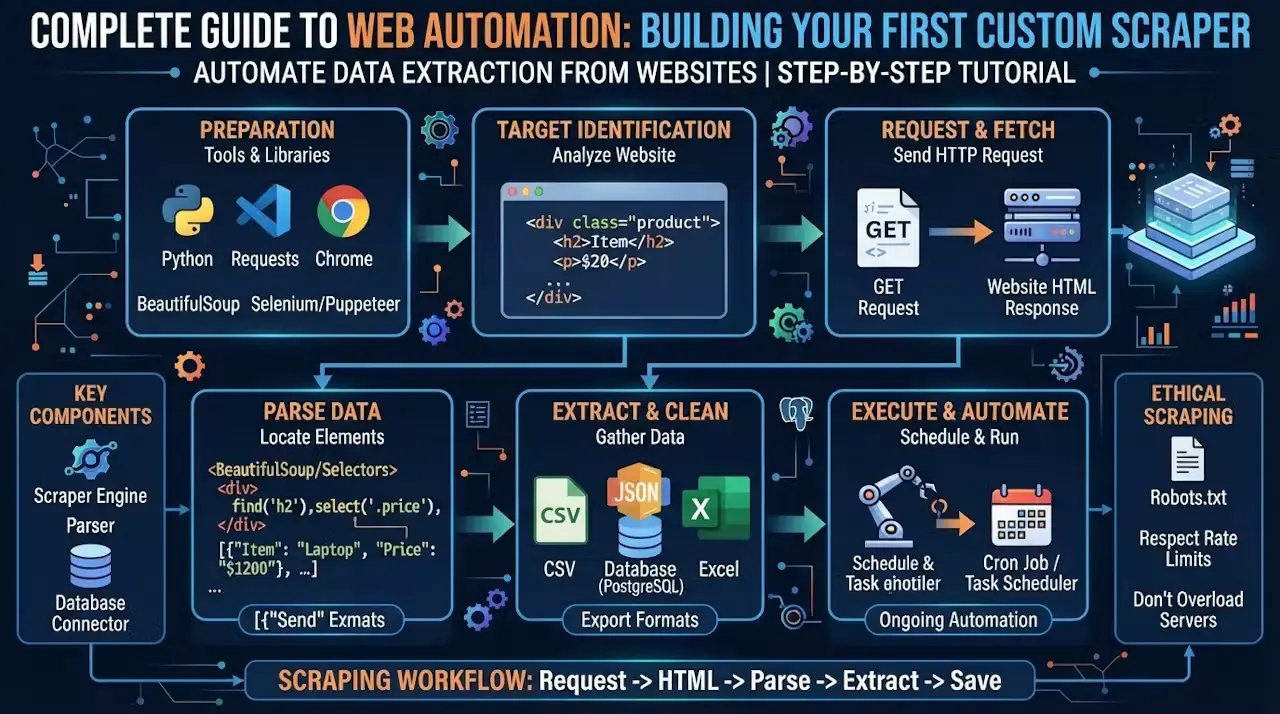
Web scraping is the foundational backbone of the modern data economy. Whether you are building an automated pricing monitor, aggregating industry-specific news, feeding structured data into an AI model, or tracking stock fluctuations, extracting clean data from the web programmatically is an essential superpower.
However, the web has evolved. The days of downloading raw HTML files with simple HTTP requests and parsing them with basic regex are largely over. Modern websites are complex Single Page Applications (SPAs) driven heavily by dynamic JavaScript frameworks, hydrations, and highly aggressive anti-bot protections.
This comprehensive guide breaks down the modern approach to web automation, taking you step-by-step through building a production-ready, resilient custom browser scraper capable of handling dynamic rendering and navigating complex web defense structures.
1. Choosing Your Stack: Why Playwright is the Modern Standard
When selecting a tool for browser automation, developers generally choose between three major open-source ecosystems: Selenium, Puppeteer, and Playwright.
While Selenium remains common for legacy enterprise QA test suites, and Puppeteer is excellent for Chrome-only microservices, Playwright (developed by Microsoft) has emerged as the modern default for data extraction.
+-----------------------------------------------------------------+
|                    WHY DEVELOPERS CHOOSE PLAYWRIGHT             |
+-----------------------------------------------------------------+
|  Native Auto-Waiting   | Isolated Contexts     | Built-in Tracing |
|  Automatically checks  | Open multiple secure  | Records DOM, network|
|  element visibility    | browser profiles in   | and console logs |
|  before interacting.   | a single instance.    | for debugging.   |
+-----------------------------------------------------------------+
Playwright operates via a direct WebSocket connection using native browser protocols, which eliminates the heavy HTTP round-trip commands required by older Selenium architectures. Furthermore, its robust auto-waiting capabilities radically reduce the “flakiness” of web scrapers when dealing with asynchronous element rendering.
2. Setting Up Your Development Environment
For this guide, we will use Python, which is highly favored for scraping and ETL (Extract, Transform, Load) tasks due to its powerful data processing libraries.
Prerequisites
First, open your terminal and install Playwright along with its required system browser binaries:
Bash
pip install playwright
python -m playwright install
3. Step-by-Step: Writing Your First Custom Scraper
Let’s build a clean, programmatic script designed to safely open a target site, wait for asynchronous UI layout elements to load, extract structured data, and cleanly export that data into standard JSON format.
Create a file named scraper.py and implement the following implementation:
Python
import json
import asyncio
from playwright.async_api import async_playwright

async def run_scraper(target_url):
    # Initialize Playwright and launch a headless browser
    async with async_playwright() as p:
        browser = await p.chromium.launch(headless=True)

        # Create an isolated browser context (simulates a clean session)
        context = await browser.new_context(
            viewport={"width": 1920, "height": 1080},
            user_agent="Mozilla/5.0 (Windows NT 10.0; Win64; x64) AppleWebKit/537.36"
        )

        page = await context.new_page()
        print(f"[!] Navigating to: {target_url}")

        try:
            # Navigate to the target page with a generous timeout configuration
            await page.goto(target_url, wait_until="load", timeout=45000)

            # Explicitly wait for the main grid container to load into the DOM
            # This mitigates race conditions on dynamic client-rendered apps
            await page.locator(".product-grid, .data-container").wait_for(timeout=10000)

            # Extract structured element metrics from the page DOM
            cards = await page.locator(".item-card, .article-row").all()
            scraped_data = []

            for index, card in enumerate(cards):
                # Target child text nodes cleanly using scoped locators
                title = await card.locator(".item-title").text_content(timeout=2000)
                price = await card.locator(".item-price").text_content(timeout=2000)
                link = await card.locator("a").get_attribute("href", timeout=2000)

                scraped_data.append({
                    "id": index + 1,
                    "title": title.strip() if title else None,
                    "price": price.strip() if price else None,
                    "url": link
                })

            # Serialize the structured array down to a clean local JSON storage asset
            with open("extracted_data.json", "w", encoding="utf-8") as f:
                json.dump(scraped_data, f, indent=4, ensure_ascii=False)

            print(f"[+] Extraction complete. Saved {len(scraped_data)} records successfully.")

        except Exception as e:
            print(f"[-] Architectural Failure or Timeout: {str(e)}")

        finally:
            # Safely release hardware control hooks and memory pools
            await context.close()
            await browser.close()

if __name__ == "__main__":
    target = "https://example.com/products" # Replace with your target URL
    asyncio.run(run_scraper(target))
4. Handling State: Managing Authentication, Storage, and Cookies
Many automation pipelines require accessing pages hidden behind authentication gates. Manually executing login procedures for every automated run is inefficient and dramatically flags your automation script to security firewalls.
The modern solution is to extract your authenticated session states and cookies once, cache them locally, and inject them into future browser contexts.
Python
# Capturing authenticated state after manual login bypass
await page.goto("https://example.com/login")
# ... Perform manual interaction/login actions ...

# Save cookies and session state to an external JSON storage payload
await context.storage_state(path="auth_state.json")

# -------------------------------------------------------------
# Reusing state on a completely different automated instantiation
async with async_playwright() as p:
    browser = await p.chromium.launch()
    # Pre-load the secure context with existing cookies and local storage state
    context = await browser.new_context(storage_state="auth_state.json")
    page = await context.new_page()

    await page.goto("https://example.com/dashboard") # Opens directly into your dashboard
5. Bypassing Advanced Anti-Bot Protections (Cloudflare, Turnstile, WAFs)
As web platforms scale up defenses against unauthorized automated collection, scrapers often run into tough firewalls like Cloudflare, Akamai, or PerimeterX. These systems monitor fingerprint anomalies, missing request headers, network levels, and behavioral tells to block bots.
To build production-grade automation that survives web scraping roadblocks, you must build resilient defenses into your scraper.
The Defensive Blueprint
- Header Sanitization: Automated engines often broadcast dead giveaways (like
navigator.webdriver = true) that scream automation. If using Python, integrate stealth wrappers like SeleniumBase or specialized Camoufox builds to mask hardware fingerprints. If using Node ecosystems, ensure puppeteer-extra-plugin-stealth is active. - Automated Proxy Rotation: If your scrapers issue thousands of fast queries from a single IP, you will trigger rate-limit flags. You must route your browser sessions through residential or mobile proxy pools, rotating the outbound proxy server configuration on every new execution thread.
- Human Emulation: Avoid robotic, pixel-perfect interactions. Introduce slight random variable delays (jitter) between actions, scroll down the page to trigger lazy loading fields naturally, and vary cursor velocities to simulate human use.
| Anti-Bot Challenge | Detection Mechanism | Advanced Evasion Strategy |
| IP Ban / Rate Limit | High volume of uniform requests originating from a single datacenter node. | Rotating Residential Proxies: Loop transactions across thousands of distinct home connections. |
| TLS/JA3 Fingerprint | Analyzing the low-level handshake pattern when your browser creates a connection. | Custom Recompiled Binaries: Use modified browsers like Camoufox to swap network signatures seamlessly. |
| JavaScript Challenges | Script evaluates if the client can process cryptographic computations invisibly. | Full Headless Inversion: Let the embedded JavaScript complete execution inside a real browser instance rather than raw script downloads. |
Summary: Designing for Long-Term Maintenance
Building an effective script is only half the battle; maintaining it is where the real work happens. Websites change their layouts, rewrite class names, and alter internal CSS properties frequently, which can easily break rigid scrapers.
To build long-term, maintainable web automation architectures, construct your scraper scripts around Semantic Locators (targeting ARIA roles, text strings, or descriptive data fields) instead of highly fragile, deeply nested CSS or XPath trees. By decoupling data targets from raw structural layout designs, your automation engine remains resilient, stable, and ready to scale.